50+ MCP tools, OAuth, and the official Runway Claude Connector
Since launching Runway's MCP server, we've continued to expand what you and your agent of choice can see and do — to the tune of 56 tools and counting. On the “read” side, new interactions that are now possible include asking for adoption rates by version, grabbing summaries of app store user reviews, checking statuses of regression testing runs and seeing how those might delay a scheduled release, quickly finding which release a given ticket or code change landed in, listing your configured integrations and their health, and much more. In the “write” direction, you can now do things like request, approve, and reject fixes, pause and resume automations, trigger CI workflows, and even spin up new hotfix releases. We’ve been carefully adding context and improving tool design to help you accomplish what you’re trying to do as quickly and naturally as possible, for example by making the MCP better at identifying releases from keywords like “next”, “current”, or “last” instead of exact version strings.
To make MCP setup easier we now support OAuth and, for those of you that use Claude, the official Runway connector is now live in their directory! Non-generative bonus: we’ve added functionality analogous to the new MCP tools to our public API where it makes sense, so you have multiple ways to integrate your stack with Runway.
Even more control and context for fix requests
We shipped a handful of updates that allow you to further customize and add rigor to Runway’s fix request flow. For teams with stricter sign-off requirements on late changes, you can now require multiple approvers per fix (e.g. calling for both a tech lead and a product owner to OK a fix before it's pulled into a release). The Feature Readiness step surfaces at-a-glance approval progress on each fix item and every individual approval is captured as a timeline event so you have a full audit trail. Plus, you can now build an entirely custom fix request form, with any number of distinct fields and optional validation on each field that can make them required, or even required with a minimum amount of text. You can also define placeholder text for each field and (separately) pre-populated text, if you like.
To further safeguard your release diffs and avoid delays, you can also now prevent new fix requests after the given release has been submitted to the store. When this feature kicks in, the fix request flow is blocked everywhere — in the Runway dashboard and via Slack actions, MCP, Release ATC chatbot, and the API — and to provide guidance to your team, you can append custom copy to the explanation shown when a request is blocked.
Track how your team’s AI usage breaks down and evolves
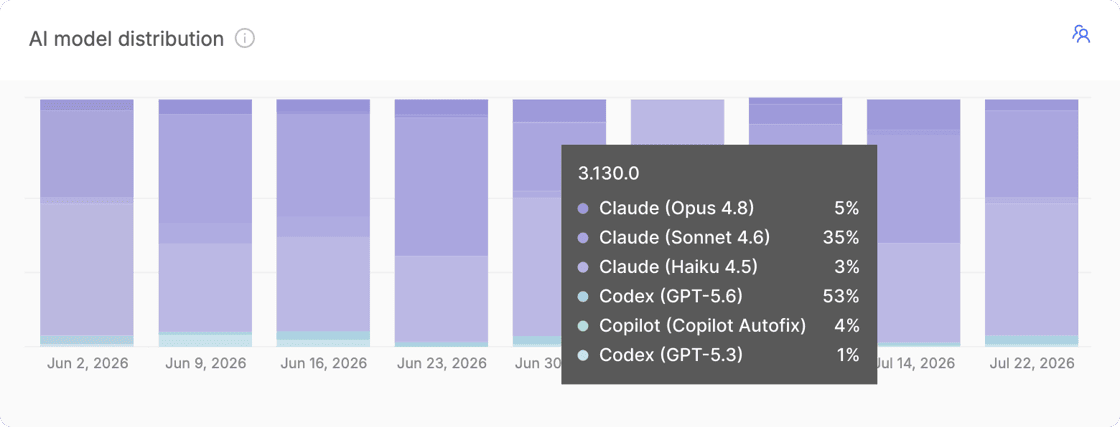
With more and more of the code teams ship being written by AI or with its assistance, we’ve heard that teams increasingly want visibility into exactly that — how much of what they're shipping has been touched by AI, and by which AI tools and models. Runway now surfaces this kind of data in a few places. On the Feature Readiness step, items are annotated with their AI authors or co-authors, and Runway drills down into pull requests to surface percentage of AI changes (by commit volume) as well as info on the specific models involved. Additionally, on both Org and Release overviews, there are new charts showing the percentage of AI-assisted changes and a breakdown of AI providers and models in use over time.
New Dependencies view for iOS
There's a new section in each release that captures the state of your iOS project's dependencies. Runway continuously scans your project’s dependencies per release and displays them in a table, surfacing which versions you're currently on and highlighting anything that’s out-of-date as well as OS requirements where applicable. For teams shipping multiple apps within one Flightpath, there's a separate tab per app so you can review dependencies for each.
Automatically create incidents and a new Incident management & scheduling integration: incident.io
In addition to leveraging an Incident management & scheduling integration to sync your on-call schedules with Runway release pilot rotations, you can now also have Runway take actions in the other direction. Based on various triggers of your choosing (e.g. if health metrics become unhealthy, an active rollout is halted, or your app is rejected during store review) Runway can automatically create an incident or alert in your incident management platform. And, incident.io joins PagerDuty, Rootly, and Jira Service Management as a supported Incident management & scheduling integration type.
More flexible logic to automatically halt unhealthy rollouts in multiple different scenarios
Runway's automation to halt an unhealthy rollout previously evaluated each configured health metric independently, so any single metric violating its threshold would trigger a halt. For more flexibility in defining auto-halt behavior, you can now create groups of metrics. Metrics within a given group are evaluated with ‘AND’ logic such that the group triggers only if all metrics violate their thresholds, and ‘OR’ logic is applied across the different groups such that they are each evaluated as independent alternatives. This lets you capture and act on more nuanced definitions of "unhealthy", for example halting only when a crash metric and a related performance metric degrade at the same time, and avoid halting rollouts on noisy, isolated signals. Groupings can be configured per release type, and any existing configuration automatically carries over as a single group.
Destination management and custom tags to make wrangling many apps even easier
For teams that ship many apps through Runway, we’ve added new functionality that streamlines how you can manage shared integrations and settings and interact with app-specific data. Related groups of apps can now be defined using “tags” (e.g. by geo, tier, internal/external audience, or whatever other dimension your team segments on), and you can use these tags to search, filter, and sort while viewing metrics, managing integration settings, or taking batch actions (coming soon). You can configure these tags and app membership via a new “destination management” section in Org settings, which surfaces all of your apps in one place and allows you to also edit app names and icons.
Public links for individual Build Distro builds
There are a number of situations where you need to get a build into the hands of someone outside your org: an external partner, a QA agency, or even just an internal stakeholder who isn't a Runway user. You already have the ability to create Build Distro buckets which allow public access, but that's overkill if you only want to share one specific build. Now, you can enable public access on individual builds. When enabled, Runway generates a unique link that will direct any viewer to the given build’s install page, and the Runway UI clearly indicates the build is publicly accessible so that’s clear to your team. Alongside these changes, there's a new Build Distro section in Org settings where you can set expiration policies for both public build and bucket links, so external access doesn't outlive its purpose.
More control over your release schedule settings
Depending on your team’s particular release cadence, you may need a certain target date top land on a subsequent week. For example, perhaps you kick off your releases on Mondays and submit on Thursdays — not the one that immediately follows, but rather Thursday of the following week. Although there were previously ways to accomplish this with the help of our team, you can now manage this for yourself in the platform, and Runway will render a helpful calendar preview of exactly how your configured schedule will play out.
And even more automation: mark releases live in monitoring tools and auto-pull submissions
A couple of other new automations will help your team maintain release hygiene and resolve blockers without extra work. First, on the iOS side, if plans change after you’ve already submitted a build for App Store review — say a late fix is added to the release, a fix request is approved, or you decide to skip that release cycle entirely — Runway can automatically developer reject the submitted build to clear the way for a new build, or for a following release. And, Runway can now mark releases as live in your stability monitoring and observability & analytics tools at the end of each release cycle. Depending on the specific integration and as needed, Runway will first create the new release in the integrated tool and may append additional context, e.g. a link to the release in Runway and the exact release timestamp.