TL;DR: To streamline your iOS release process, separate the time Apple controls (build processing, App Review, and, if you use it, phased release) from the time your team controls, then optimize your side. Put kickoff and version bumps on a schedule, guard build selection, move App Store Connect work onto automations and approvals, and land every release with a phased rollout, health thresholds, and a hotfix or rollback path you prepared in advance. Apple reviews most submissions in under a day; nearly everything else in the cycle is on your side and can be scheduled, automated, or gated for review.
Picture a typical iOS release. Code freeze might land on a Tuesday, which means the update reaches users the following Wednesday. Very little of what happens in between is coding work. It's somebody picking the right build, a round of sign-offs, release notes in 12 locales, a submission, and a lot of waiting on people who are busy with something else.
It's tempting to blame Apple for that release delay. Yes, Apple's part is real, but it's a few hours on a typical submission. Most of the gap comes down to the process your team built, one step at a time, which also means it's yours to streamline.
It helps to be precise about what streamlining means here, because it covers two separate outcomes.
- The first is efficiency: fewer engineer-hours burned per release, which is most often felt by your senior engineers.
- The second is velocity: less elapsed time between code freeze and users having it, on a date you can predict, which is what your roadmap and your leadership notice.
The practices below support both while maintaining app quality. We'll go through a release stage by stage, separating Apple's process from the requirements of yours, and show where teams have cut that time while keeping the pipeline they already have.
What actually makes iOS releases slow?
An iOS release splits into time Apple controls and time your team controls. Apple controls build processing and App Review. Your team controls everything else: branch cuts, version bumps, build selection, App Store Connect housekeeping, sign-offs, submission, release, and rollout. Most teams overestimate the time spent on the first and underestimate the time wasted by the second.
Apple's review time is shorter than most teams think
Apple states that, on average, 90% of submissions are reviewed in less than 24 hours. Runway's App Review Times tracker, which averages real submissions from teams releasing with us over the trailing two weeks, put it at 8h 29m waiting for review, 2h 38m in review, and 31m of build processing when we last checked.
You can still influence how long Apple takes. Apple says over 40% of unresolved review issues trace back to guideline 2.1, App Completeness, which covers crashes, placeholder content, and missing information. A rejection restarts the wait, so a complete submission is your main lever on review time.
Your team's time goes to small steps that wait on each other
Each step on your side takes minutes. The problem is that each one is dependent on the previous, often across different people and several days, and the whole sequence repeats every cycle. The numbers bear this out:
- The hours add up per release. In Runway's 2025 State of Mobile Release Management report, the average engineer spent five hours per release on manual, repetitive tasks. Among teams with heavy automation, 51% still lost six to 10 hours per release. Across respondents, roughly a third of every release cycle went to busywork, about 130 hours a year for a biweekly team on manual work alone.
- Status is its own job. In our 2026 survey of 300 mobile engineering managers, 94% said they spend three or more hours per release cycle on status updates and stakeholder coordination, and 28% spend six or more.
- It lands on your most expensive people. In the same 2026 survey, 47% of teams run releases through senior mobile engineers.
- Hotfixes repeat the whole thing under pressure. In the 2025 report, 77% of teams needed a hotfix every three to five releases, and each one is a compressed rerun of the release process.
- AI is adding volume to the same process. More AI-assisted PRs mean more changes to test, triage, and sign off on in every release, and most teams are handling that with people. In our 2026 survey, 75% of teams run a formal safeguard before AI-generated code reaches production. The most common one (44%) is approval from a senior or designated reviewer, often the same engineers who run the release.
Our customer examples bear this out as well. A typical team we speak with has a checklist of around 40 manual steps that need to happen on time, in the right order, every release. That was the case at Favor. At Fleetio, somewhere between 15 and 30 people were involved in any given release, and Brandon Yates, senior mobile platform engineer, describes the before state plainly: "Releases used to take two to four hours for an experienced engineer, and longer if something went wrong."
At Flink, each release took half a day to a full day. With four apps on a biweekly cadence, that was eight to 16 hours of an engineer's time every week. At VSCO, engineers spent four to eight hours per release managing the process as well.
How do you streamline an iOS release process, stage by stage?
Most of the time on your team's side can come out without adding risk. At each stage, automate the mechanics and put a guardrail on the decision, as in the examples below.
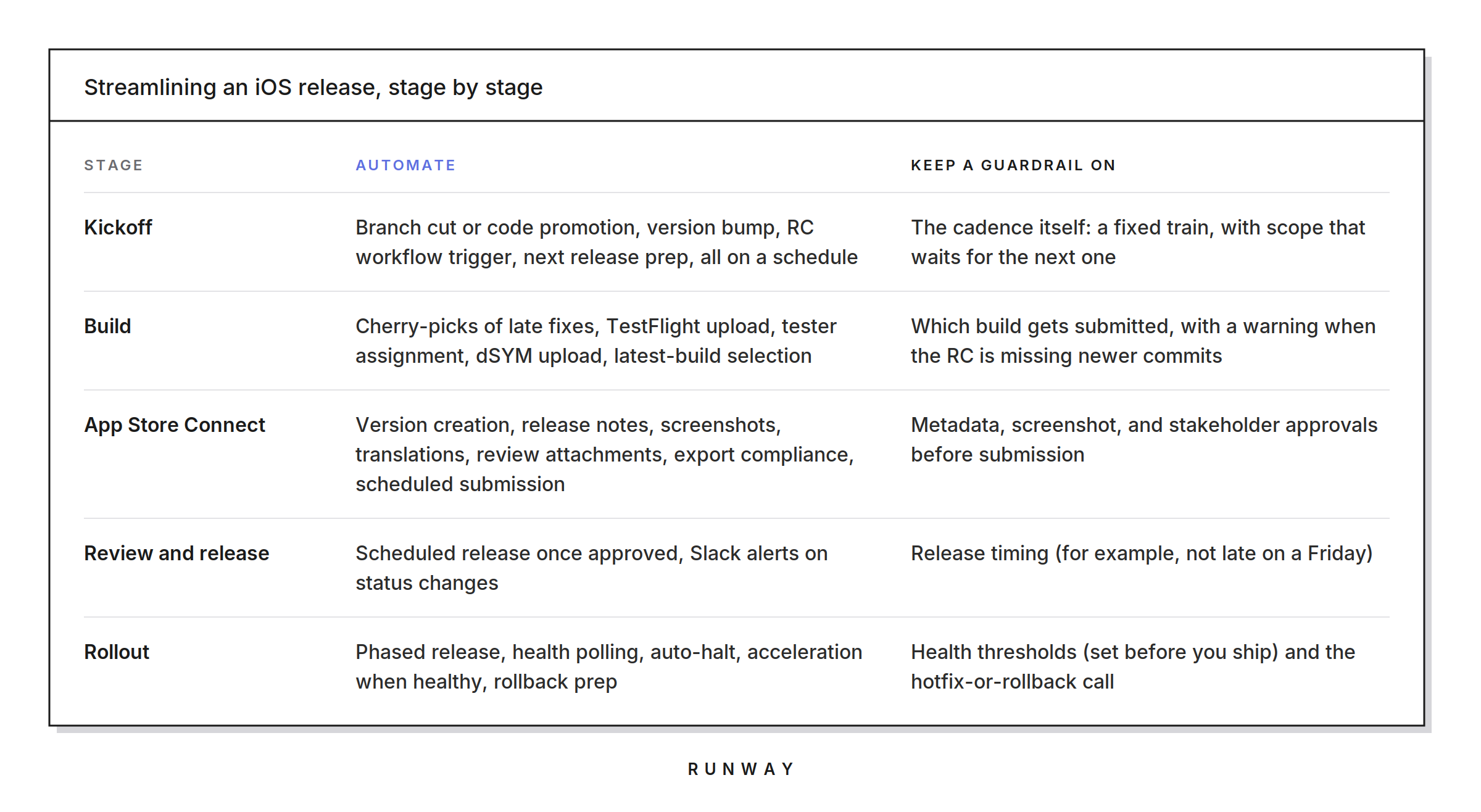
The rest of this section takes each stage in order, starting with kickoff, because the cadence you set there decides how often every later step has to run.
Put kickoff on a schedule, and run a release train
If your releases kick off only when someone remembers to start them, cadence drifts, scope creeps into the window, and the next release gets bigger. We recommend a release train. Kickoff, submission, and release land on fixed days, and any feature that misses the train catches the next one, ideally behind a feature flag so the code can merge before the feature launches. A train changes how you communicate feature launches and plan QA time, so plan for both before the first departure.
The data also supports smaller, more regular releases. DORA's 2025 research names working in small batches as one of seven capabilities that amplify the benefits of AI-assisted development, improving product performance and reducing friction for teams.
Start with a cadence you know you can hold. Our mobile release process best practices recommend starting with a cadence of about three weeks and tightening after a few months on schedule, rather than committing to weekly and then realizing the team and process can't support it.
Once the cadence is set, kickoff shouldn't need a human trigger. A release schedule should set target dates for kickoff, submission, and release, with automations doing the work on those dates, from cutting the release branch and triggering the RC build to bumping the version and drafting the next release with a pilot assigned. Homegrown scheduling tends to break here. Flink needed a code freeze every two weeks, but its CI only supported weekly schedules, so a scripted kickoff would have been wrong half the time.
Make build selection a guardrail, not a guess
Shipping the wrong artifact is an avoidable incident. It usually happens when a late fix lands after the RC was built and nobody notices before submission.
Two things close that gap.
- Automate the mechanics around late work: cherry-pick merged fixes from the working branch onto the release branch, upload builds to TestFlight for your default testers, and upload dSYMs so the first crash of a new build is readable.
- Check the artifact against the code. Have your tooling verify whether the release diff contains commits that aren't in the selected RC and show a warning before submission. Keep the submit button enabled, so the release pilot still makes the call, now with the context to make it well.
We see the same split across our customers. When Fleetio rebuilt its release process, the team could have automated everything and chose not to. "The technical aspects we were able to automate pretty quickly," Brandon Yates said. "We kept a few things manual just to keep people awake at the wheel." A guardrail here means a defined checkpoint with a named owner and the information needed to decide, and it should sit on the default path so skipping it takes effort.
Take App Store Connect out of the browser
Everything you do in App Store Connect during a release, from version creation and localized metadata to review submission and phased release, is available through the App Store Connect API, so it can run on a schedule. In practice, most of it still happens by hand. VSCO's Henry Ly described how "release pilots had to keep multiple App Store Connect tabs open, CircleCI tabs, Jira tabs… just trying to follow the entire process was a lot."
Runway's App Store management automations create the new version, select the latest build, and apply release notes, App Review information, and export compliance answers, then submit and release on your schedule.
Store content takes more coordination, because release notes, promotional text, keywords, and screenshots come from product, design, and marketing, often in every locale you ship. App Store Connect won't create the next version until the current one is live, so stage metadata and screenshots ahead of time wherever your tooling allows it. It also helps to flag locales with missing content, draft release notes from tickets and PRs within each store's character limits, and hold the scheduled submission until stakeholder approvals are in. Keep screenshots current, too, since Apple's guideline 2.3 expects them to accurately reflect the app.
Land it safely: Phased release, health gates, fast diagnosis, and a recovery path
Once a build is approved, the job is to limit how many users a bad build can reach and to decide how you'll recover before you need to. On iOS, that comes down to the practices below.
Use phased release, and know its limits. Apple's phased release ramps an update to 1%, 2%, 5%, 10%, 20%, 50%, then 100% of automatic-update users over seven days, and you can pause it for up to 30 days. Anyone can still download the update manually, though, and there's no way to revert to the previous binary.
Define "healthy" before you ship. Set thresholds for crash-free sessions and users, key events, and ratings while nobody is under pressure. Poll those health metrics frequently during the rollout and halt it automatically when one crosses its threshold, or release to 100% early once a healthy rollout reaches a minimum adoption level.
Get to the cause without the rabbit holes. Rollout alerts should list new and trending crashes, and a single triage list should pull QA regressions, beta feedback, store reviews, and unhealthy metrics together with a suggested cause and owner.
Keep the hotfix path short. Branch the hotfix off the live release tag and cherry-pick only the fix, then request Apple's expedited review if the bug is critical. Fleetio's hotfix turnaround dropped from several days to a few hours.
Have a rollback ready. The App Store can't revert a release. The workaround is to re-sign the last stable binary with a higher version and build number and submit it as a new version. Only one version can be in review at a time, though, so that's hard to pull off in the middle of an incident. Runway Rollbacks prepares that build in the background of every release and, on iOS, gets it through review ahead of time. If the bad release ran an irreversible migration, roll forward instead.
With those pieces in place, a bad build becomes a contained incident with a known next step, and the release train keeps its schedule.
Why your iOS release process should be boring
Apple's part of the release typically takes under a day. Everything else is yours to streamline, and the pressure to do it is growing. DORA's 2025 report found that AI adoption is helping teams ship more often but making delivery less stable, and that without strong control systems, more change volume leads to instability. For a mobile team, more PRs mean more commits landing after the RC is cut, more issues to triage, and more releases where a person has to decide whether something is safe to ship.
The safe way to ship can also be the fast way. In our 2026 survey, 39% of teams with a validation gate for AI-touched code ship weekly, compared with 5% of teams with no safeguard.
The goal is a release process nobody has to think hard about, with a schedule that runs itself, store work that's done before submission day, checkpoints with owners, rollouts that stop themselves, and a recovery path that's already built. Or, as Fleetio's Ben Conway put it when asked what would happen without it: "It'd be similar to an airport control tower not being available and everyone just figuring out how to take off by themselves."
A next step you can take this week: Pick your last iOS release and log every manual touch, who did it, and how long the release waited on it. Automate the three longest waits, and put a guardrail on any step that could ship the wrong build.
If you want to see what that looks like on top of the CI/CD you already have, explore the Runway sandbox or talk to our team.
FAQ
How long does App Store review take?
Apple states that, on average, 90% of submissions are reviewed in less than 24 hours. Runway's App Review Times tracker, based on real customer submissions, showed an average of 8h 29m waiting for review and 2h 38m in review over the two weeks ending Sep 18, 2026. Incomplete submissions and rejections add time, and a rejection restarts the wait.
What parts of the iOS release process can be automated?
Nearly all the mechanical steps, including branch cuts, version bumps, RC builds, cherry-picks, TestFlight uploads, App Store Connect versions and metadata, submission, release, and phased rollout. Decisions such as which build ships, stakeholder sign-off, and whether to halt, hotfix, or roll back should stay with a named owner, supported by guardrails.
Can you roll back an iOS app release?
Not natively. The App Store can't revert to a previous binary, and a phased release can only be paused. The practical equivalent is to re-sign the last stable build with a higher version and build number and submit it as a new version, which Runway prepares in the background of each release so it's ready when you need it.
How does phased release work on iOS?
Phased release rolls an update out over seven days to users with automatic updates (1%, 2%, 5%, 10%, 20%, 50%, and 100%). You can pause for up to 30 days or release to everyone at any time, and users can still download the update manually.
Do I need to replace my CI/CD to streamline iOS releases?
No. CI/CD builds and tests the app; most release time is lost in the coordination around it. Runway layers on top of CI providers like Bitrise, GitHub Actions, and CircleCI with no migration, and handles the release steps before and after the build.